


Skip to editor

IVR Voice Generator — Create Professional IVR Recordings for Every PBX

Commercial-grade IVR voice generator — mix voice, SFX chimes and background music in one render. WAV, MP3, μ-law native for every PBX.

en-US
Style
speed:1.0
pitch:0
Volume:100%
File
Pause
Clear
Step backward
Step forward
Ssml
Cut
Sound Selection

The IVR voice generator for commercial phone systems — mix voice, SFX chimes and background music into one phone-ready file. No audio editor, no post-production.

01

SFX + music in one render

Drop <sound id="X"/> for a chime or beep and pick a bed from 130-plus royalty-free music tracks — both mix in with the voice on the same Convert click.

02

9 audio formats

mp3, wav, ogg, opus, m4a, flac, webm_opus — plus wav_mulaw and wav_alaw for Asterisk, FreePBX and Cisco. Everything a PBX accepts, native.

03

SSML for telephony

Phone numbers, account digits, currency, dates, appointment times — all read the way callers expect thanks to <say-as>.

04

Batch ZIP export

Drop <cut name="01-welcome"/> between segments — one paste, one Convert, one ZIP of named MP3s ready for your dial-plan.

Audition any voice free: a fresh signup gets bonus credits — render a full test IVR, listen on your PBX before committing. No card required. Commercial plans from $4.99/year, licence attached to every file — See pricing →

One IVR Voice, Three Phone-Tree Roles — Studio → VoIP → Telephony

A real phone tree needs three different tones from the same voice: a warm greeter for the welcome, a firm system voice for confirmations, and a calmer voice for on-hold reassurance. Below each recipe is rendered at the actual sample rate that trunk carries: 48 kHz studio for the greeter, 16 kHz VoIP band for the system voice, 8 kHz G.711 telephony for the hold message. Play them back-to-back and hear the bandwidth drop out.

Each prompt is bookended by a real auto-attendant entry chime and a confirmation cue, dropped into the script with a single <sound id="X"/> tag — no audio editor required. Two icons on each card: ↓ download the exact WAV shown (drop into your PBX as-is), or open in editor where supported (native 48 kHz MP3 for the greeter, native 8 kHz µ-law for the hold). The 16 kHz card is download-only — SpeechGen does not export native 16 kHz, so the file is locally downsampled on this page.

Friendly American woman wearing a cream blouse smiling warmly in a softly-lit professional office
Reception Greeter 48 kHz · pitch 0 · speed 1.0
Studio reference — unaltered 48 kHz. The warm “thank you for calling” opener at full bandwidth.
Confident American woman in a navy blazer with a neutral expression in front of soft studio backdrop
System Confirmation 16 kHz · pitch −1 · speed 1.1
Modern VoIP band — 16 kHz, downsampled locally on this page (the SpeechGen engine does not export native 16 kHz — grab the WAV here for direct PBX upload).
Calm American woman wearing soft beige clothing seated in front of a warmly lit muted backdrop
On-Hold Reassurance 8 kHz · pitch −2 · speed 0.9
G.711 telephony — native 8 kHz µ-law, the actual bandwidth an Asterisk / Avaya / Cisco caller hears. Calm, unhurried hold.

Eight Industry IVR Recipes — One Voice Per Vertical

One voice does not fit every business. Eight industry-tuned recipes — each card is a different HD voice with the pitch and pace already set for that vertical. Tap to hear the sample, hit the arrow to open the full IVR-tree script in the editor.

Six Named Voice Styles for IVR — Listen to Each

Six SpeechGen voices ship with named delivery styles — same voice, different tone for a different IVR moment. One style per phone-tree role: from welcoming the caller to confirming a transfer, from emergency announcements to bank-grade formality. Tap to hear each, hit the arrow to open the editor with the voice and the style= parameter already set.

Not every voice exposes a Style dropdown — many of our most natural-sounding voices ship without named styles. If you need a specific register and your current voice does not list it, switch to Jenny US or June US for that prompt and combine with the rest of your IVR-tree via <cut/>.

Text to Speech IVR — SSML for Telephony Numbers

A text to speech IVR is only useful if the engine reads numbers correctly. Without SSML, an eleven-digit phone number renders as a single decimal number — unusable for a caller who needs to write it down. Wrap it in one <say-as> tag and the engine groups the digits into the natural phone-number rhythm. Four side-by-side plain-vs-SSML comparisons below, same voice. Listen and compare.

Phone Number

Plain textPlease write down our callback number 18778342691.
With SSMLPlease write down our callback number <say-as interpret-as="telephone">+18778342691</say-as>.

The default reading gives one long number. interpret-as="telephone" groups the digits into the natural three-three-four phone-number rhythm with the pauses humans expect.

Account Number Readback

Plain textYour account number is 4837290165.
With SSMLYour account number is <say-as interpret-as="digits">4837290165</say-as>.

The default reading turns the number into millions. interpret-as="digits" forces digit-by-digit readback — mandatory for any number the caller needs to verify or write down.

Billing Amount

Plain textYour balance is $1245.99 USD.
With SSMLYour balance is <say-as interpret-as="currency">$1245.99</say-as>.

Without SSML the engine often reads symbols and digits literally. interpret-as="currency" says “one thousand two hundred forty-five dollars and ninety-nine cents” — the only acceptable phrasing for a billing IVR.

Appointment Date and Time

Plain textYour appointment is on 2026-07-15 at 14:30.
With SSMLYour appointment is on <say-as interpret-as="date">2026-07-15</say-as> at <say-as interpret-as="time">14:30</say-as>.

The raw form reads as a hyphenated string of digits. interpret-as="date" and interpret-as="time" produce “July fifteenth, twenty twenty-six” and “two thirty p.m.” — exactly what an appointment reminder needs.

Multi-Voice IVR Scenes — Greeter + System + Hold in One Synth

A real IVR has a greeter voice, a system-confirmation voice, and sometimes a live agent voice. SpeechGen multi-voice renders all three in one synth call — no stitching, no post production. Both scripts open in the editor with all voices and the music bed pre-loaded. See the multi-voice tutorial →

Healthcare — Clinic Reception Flow

2 voices · 1 hold message · bg music
Aoede US — the Greeter Charon US — the System Voice
  1. AoedeThank you for calling Bayview Family Clinic. If this is a medical emergency, please hang up and dial nine one one. For appointments, press one. For prescription refills, press two. To speak with the front desk, stay on the line.
  2. CharonYou selected appointments. Please hold while I transfer you to scheduling.
  3. AoedeThank you for holding. Your call is important to us. The next available scheduler will be with you in just a moment.
Easy Listening bed at 18%, looped

Rendered in a single synth via <dialog voice="Charon US">…</dialog> wrap around the system line — see how multi-voice tagging works →
Open in editor

E-commerce — Order Status Flow

2 voices · 1 SSML readback · bg music
Sulafat US — the Greeter Puck US — the Confirmation Voice
  1. SulafatWelcome to Northwave Online. To check order status, press one. For returns, press two. To speak with a representative, press zero.
  2. PuckYou selected order status. Please enter your order number followed by the pound key, or say your order number now.
  3. SulafatOrder number 820164 is currently in transit. Estimated delivery: June 28th, 2026.
Corporate bed at 12%, looped

Sulafat is the main voice, Puck's confirmation line is wrapped in <dialog voice="Puck US">…</dialog>see how multi-voice tagging works →

Open in editor

IVR Text to Speech Formats — One File, 8 PBX Platforms

IVR systems are picky about audio format. Twilio wants 16 kHz WAV. Asterisk wants 8 kHz µ-law. RingCentral takes MP3. Most TTS sites give you one MP3 and call it done. The Settings panel here exposes every codec your PBX actually accepts — native, no conversion round-trip.

9 Export Formats — Pick by Use Case

mp3 Universal — RingCentral, Nextiva admin, mobile-app prompts, any web player. Smallest file, plays everywhere.
wav Uncompressed PCM — Twilio, Amazon Connect, 3CX, Avaya. Set Sample Rate 8 kHz or 16 kHz to match your PBX.
wav_mulaw G.711 µ-law 8 kHz — native Asterisk, FreePBX, Amazon Connect, Cisco NA. Skip on-call transcoding on the PBX.
wav_alaw G.711 a-law 8 kHz — native Cisco EU, European ITSPs, most non-NA carriers. Same fidelity, different companding curve.
ogg Vorbis in an OGG container — Firefox-native playback, open-source apps, embedded devices that reject MP3 patents.
opus Modern low-bitrate codec — WebRTC, Discord, Signal, any SIP trunk that already negotiates Opus. Best speech quality per kilobyte.
webm_opus Opus in a WebM container — browser-native (Chrome / Edge / Firefox), ideal for <audio> tags on marketing pages and web IVR clients.
m4a AAC in an MP4 container — iOS / macOS native, Apple Podcasts, iMessage voice notes, any Apple-side production chain.
flac Lossless archival — keep a master copy for re-mastering later or handing to a downstream mastering studio. Not for PBX playback (file too big).

Which platform wants which format?

Platform Format Sample rate Channels Notes
Twiliowav16 000 HzmonoStudio + Programmable Voice play 16 kHz mono WAV natively. Use 8 kHz only for very long hold messages.
Asterisk / FreePBXwav_mulaw8 000 HzmonoG.711 µ-law — the Asterisk-native phone codec. Drop into /var/lib/asterisk/sounds/ and reference by name in your dialplan.
Amazon Connectwav8 000 HzmonoConnect prompts upload as 8 kHz mono WAV (PCM 16-bit). Generate at 8 kHz directly and skip the ingest conversion round-trip.
3CXwav8 000 Hzmono3CX expects 8 kHz mono PCM WAV for all digital receptionist prompts.
RingCentralmp3 64 kbps24 000 HzmonoAdmin accepts MP3 from 8 to 256 kbps. 64 kbps mono at 24 kHz is the sweet spot — small file, clean phone-band audio.
Cisco UCM / CUCMwav_alaw8 000 HzmonoCisco Unified Communications uses G.711 a-law in EU regions and µ-law in NA — pick the variant matching your dialplan.
Avaya IP Officewav8 000 Hzmono8 kHz mono PCM WAV. Upload via Manager > Auto Attendant > Add Greeting.
Nextivamp3 64 kbps24 000 HzmonoAdmin accepts MP3 or WAV. MP3 64 kbps mono = upload-friendly file size.

All values are real SpeechGen Settings panel options. Open the panel under the editor, set Format / Sample Rate / Channels to match your platform, hit Convert. Your file is phone-system-ready on first Convert.

Batch IVR Recording — One Paste, ZIP of Every Segment

Forty separate phone-tree files used to mean forty Convert clicks and forty manual file renames. Drop a <cut name="01-welcome"/> between each segment and the ZIP archive comes back with files already named the way your PBX expects them — 01-welcome.mp3, 02-main-menu.mp3, 03-sales-hold.mp3… no rename pass, no post-production. Full <cut/> tag reference →

1

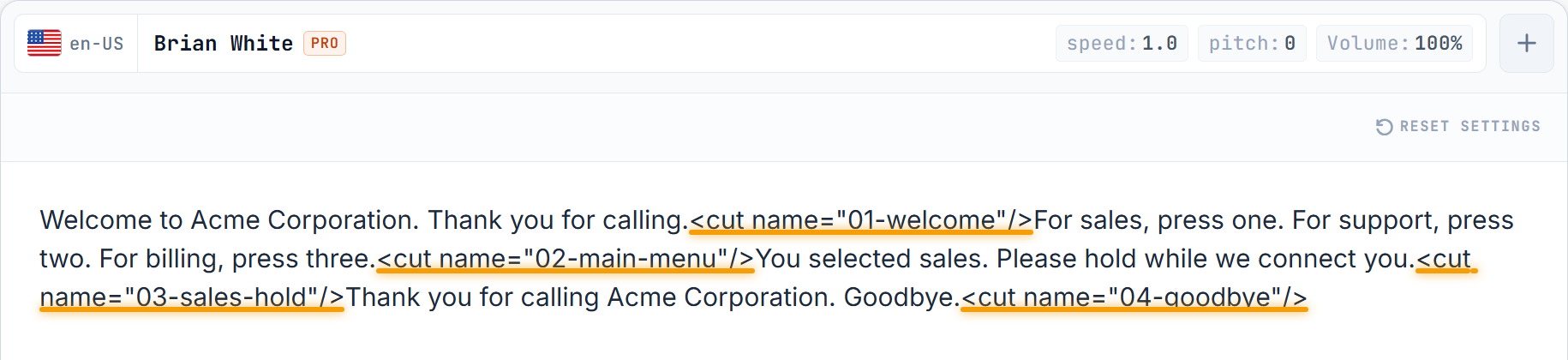
Paste your script with named cut tags

Drop <cut name="NN-description"/> between segments. Each tag becomes the file name of the segment in the output ZIP.

SpeechGen editor with a 4-segment IVR script pasted in. Four inline <cut name='01-welcome'/> through <cut name='04-goodbye'/> tags are underlined in orange.
2

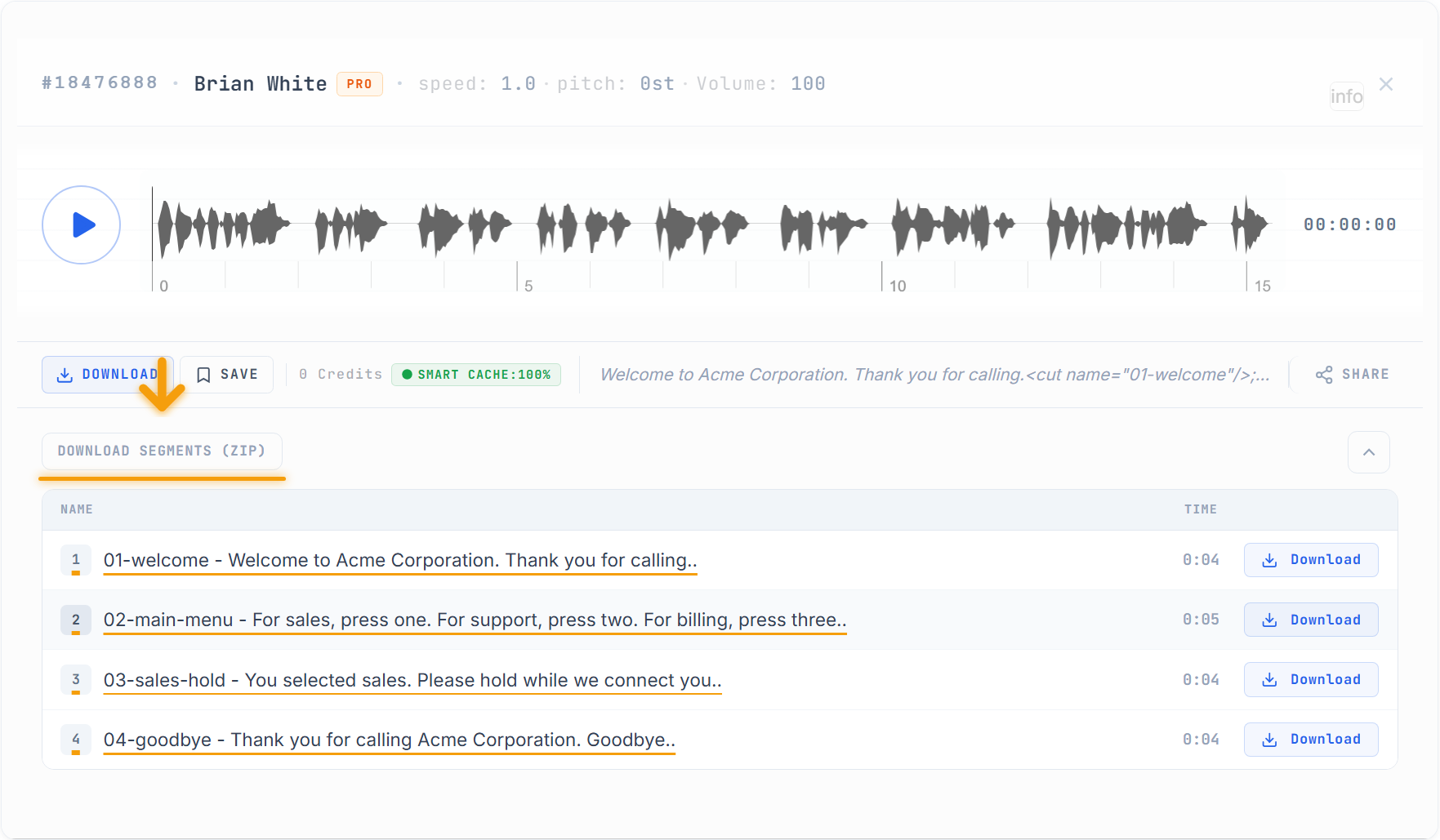
Click Convert — grab the ZIP of named MP3s

Each cut name becomes the file name inside the archive. Click DOWNLOAD SEGMENTS (ZIP) to grab all four files at once in dial-plan order.

Result panel with 4 named MP3 segments (01-welcome, 02-main-menu, 03-sales-hold, 04-goodbye), each with its own Download button and an orange-underlined DOWNLOAD SEGMENTS (ZIP) button at the top with a downward arrow pointing at it.
Show the paste-ready script — named cuts produce named files

Add a name attribute to each <cut/> and that exact string becomes the segment's file name inside the ZIP. Pattern NN-description keeps the archive sorted in dial-plan order.

Welcome to Acme Corporation. Thank you for calling.<cut name="01-welcome"/>
For sales, press one. For support, press two. For billing, press three.<cut name="02-main-menu"/>
You selected sales. Please hold while we connect you to the next available representative.<cut name="03-sales-hold"/>
You selected support. For technical questions, press one. For account questions, press two.<cut name="04-support-menu"/>
You selected billing. Please enter your account number followed by the pound key.<cut name="05-billing-prompt"/>
We are sorry, our offices are currently closed. Our hours are Monday through Friday, nine a.m. to six p.m. Eastern time.<cut name="06-after-hours"/>
Thank you for calling Acme Corporation. Goodbye.<cut name="07-goodbye"/>
Open this 7-segment script in the editor →

The Download Segments (ZIP) button is a Pro-tier feature on the editor. Free-tier callers still use <cut name="..."/> tags — each segment becomes its own card with an individual Download button labelled with the same name below the main player.

Hold Music — The Same Line in Three Moods

Same voice, same hold-line script — three different music beds from the built-in royalty-free library. Corporate for finance lobbies. Easy Listening for general customer service. Acoustic Guitar for restaurants and clinics. Click each card to hear the bed change.

Corporate bed

Finance, banking, B2B — trustworthy, serious

Easy Listening bed

General customer service — warm, non-distracting

Acoustic Guitar bed

Restaurants, clinics, local SMB — personal, relaxed

The music picker holds 130-plus categories — Ambient, Lounge, Calm, Gentle, Soothing, Classical, and more. Open Settings → click the music slot → browse categories → pick a track → the engine mixes voice and bed in a single render.

Four More AI IVR Voices — British and Australian Extras

Pick your IVR voice from the extended catalogue. Four additional HD voices to complete the phone-tree roster — British formal register for government and legal, mid-tone British for everyday business, Australian male and female for local-market phone systems. Tap a card to hear the IVR voice sample — click the arrow to open the editor with the voice and a line pre-loaded.

Four Common IVR Audio Pitfalls — and the One-Line Fix for Each

Most IVR audio complaints trace back to the same four render-time mistakes. Each one has a specific setting or SSML tag that fixes it — before the caller ever hears it.

01

The prompt clicks or clips on playback

Symptom: the IVR file plays fine on your laptop but crackles or clips when the PBX serves it.

Cause: the file was rendered at 44.1 kHz stereo (a music default) and the phone system down-samples on the fly to 8 kHz mono.

Fix: in Settings set Sample Rate to match your platform (8 kHz for Asterisk / Amazon Connect / 3CX / Cisco / Avaya, 16 kHz for Twilio / RingCentral) and Channels=mono. Render once, done — no round-trip conversion.

02

Asterisk transcodes on every call

Symptom: voice quality drops after a few weeks in production, or CPU on the PBX rises with every concurrent call.

Cause: the file is standard wav (16-bit PCM) and Asterisk transcodes to G.711 μ-law on every playback — extra CPU + lossy re-encode on top of your already-narrow bandwidth.

Fix: render as wav_mulaw directly (Format=wav_mulaw, Sample Rate=8000). Asterisk plays it byte-for-byte, no transcode, no quality drop.

03

Callers cannot write down a phone number

Symptom: customers call in a second time asking for the callback number because they "did not catch it."

Cause: the number reads at conversation speed with no pen-grab pause, and either has no say-as wrapper (so it reads as one long numeral) or has one but starts immediately after the announcement.

Fix: add a 500 ms break BEFORE the number and use the telephone tag: …call our line at <break time="500ms"/><say-as interpret-as="telephone">+18778342691</say-as>. Half a second is what a pen actually needs.

04

DTMF tones miss on the menu

Symptom: callers press 1 but the IVR does not route — either it hangs, or it drops to the "invalid input" branch.

Cause: background music is louder than 25 % and its frequency band overlaps the 697–1633 Hz DTMF grid, so the tone detector mishears.

Fix: in the music picker cap the volume at 18 % (the safe default) or turn music OFF entirely for the menu-selection prompt. Reserve music for the greeting and the on-hold segments, not for the input-collecting ones.

Three Ready-to-Paste IVR Voice Prompt Scripts

Three full phone-tree scripts — welcome, menu, system confirmation, after-hours fall-through — each with named <cut/> segments and its own unique pair of SFX bookends: a distinctive opening chime plus a closing cue that fit the industry. Cash-register on a return line reads differently than a formal ship-chime on a bank IVR.

Each template wraps its cuts as <cut name="01-welcome"/><cut name="04-fallback"/> and comes with its own SFX pair pre-inserted (see numeric IDs on each card). Open, swap the bracket placeholders ([CLINIC NAME], [BANK NAME]…) with your own copy, hit Convert — ZIP is one click after.

Frequently Asked Questions

Twilio Studio & Programmable Voice — what are the file-size and hosting gotchas?

TwiML <Play> has a 5 MB per-file limit. A single long hold-music loop will fail — use named <cut/> segments (§7) to split, then stitch with multiple <Play> verbs in your TwiML. Twilio also requires HTTPS-hosted URLs: after Convert, host the file on your own CDN, S3 bucket or a signed Twilio Assets URL. Native format is 16 kHz mono WAV (see §6 for the exact Settings values).

How do I stop Asterisk / FreePBX from transcoding on every call?

Render as wav_mulaw at 8 kHz mono — that is the native Asterisk codec and plays byte-for-byte. Asterisk resolves prompts by base name without extension, so upload welcome.wav to /var/lib/asterisk/sounds/en/ and reference it in the dialplan as Playback(welcome). For FreePBX use Admin → System Recordings → Add. On pjsip.conf trunks add allow=!all,ulaw to force the codec on the trunk itself and skip any downstream transcoding round-trips.

Phone numbers with extensions or international format — SSML edge cases?

Wrap the number in <say-as interpret-as="telephone"> as covered in §4. Two extra tricks: (1) extensions — "+1 555-1234 x789" must split into two say-as blocks (telephone + digits), otherwise the engine reads "x" as the letter; (2) international format — always include the country code with a leading + so the engine picks the right rhythm (US 3-3-4 vs UK 4-3-3 vs FR 2-2-2-2-2). For "call our line at 555…" add <break time="500ms"/> before the number — half a second is what a pen actually needs.

What is the difference between wav_mulaw and wav_alaw — which one do I pick?

Both are G.711 8 kHz mono, same fidelity, same file size — only the companding curve differs. μ-law (wav_mulaw) is the standard across North America and Japan — use it for Asterisk, FreePBX, Amazon Connect, Cisco NA, most US carriers. A-law (wav_alaw) is the standard across Europe, the Middle East, Africa and most of Asia — use it for Cisco EU, European ITSPs, and any non-NA carrier. If your PBX is multi-region check its trunk configuration; the wrong variant plays back as a hiss.

How long can a single IVR render be, and what happens past the limit?

50,000 characters per Convert call on commercial plans — roughly one hour of speech, enough for the deepest phone tree. For scripts above that, split with <cut name="…"/> and download all segments at once (each cut still counts against the same 50k budget, so a 12-segment tree at ~4,000 chars each fits comfortably) — see the full <cut/> tag reference for every attribute and edge case. The signup bonus is intended for test-drive use (audition a voice, render one menu, listen on your PBX) — a full production IVR runs on a paid plan.

We use cookies to ensure you get the best experience on our website. Learn more: Privacy Policy

Accept Cookies